App Builderのリリースノート
注記
App BuilderはADSで利用可能な、進化を続ける新しい製品です。より洗練され、強化されたユーザーエクスペリエンスを提供するために、機能は予告なく変更される場合があります。ご理解に感謝するとともに、Alteryxコミュニティでは、App Builderの継続的な改善のため、フィードバックをお待ちしています。
App BuilderはAlteryx Oneでホストされています。基盤となるプラットフォームの詳細については、Alteryx One Platformのリリースノートを参照してください。
2025年4月25日
新規ユーザーのオンボーディング体験の向上
App Builderでは、新規ユーザーのオンボーディング体験が強化されました。
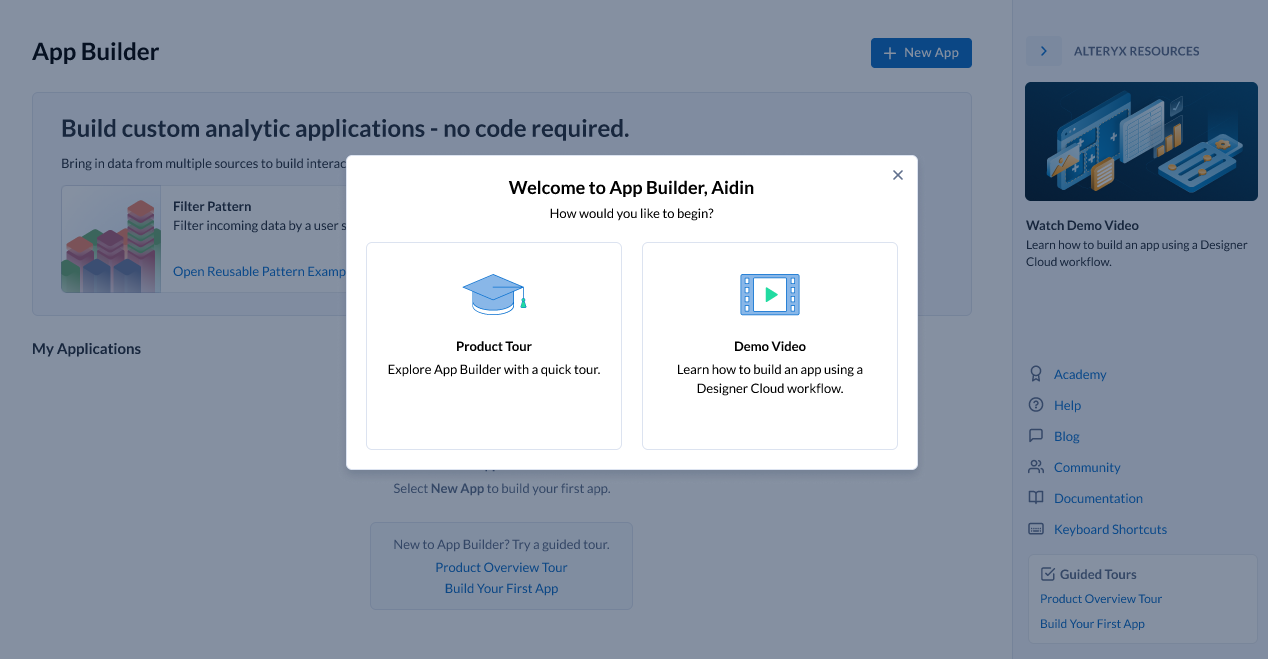
新機能
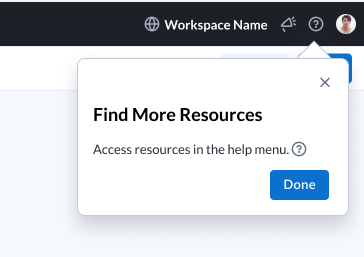
初めてのユーザーには、新たにダイアログが表示されるようになり、製品ツアーと短い動画の2つのオプションからApp Builderを詳しく知ることができます。現在のワークスペースにアプリがないユーザーには、ランディングページに2つのリンクが表示され、製品概要ツアーかはじめてのアプリを構築にアクセスできます。ツアーを閉じると、ヘルプメニューを案内する最後のポップアップが表示され、そこでさらに多くのリソースを見つけることができます。
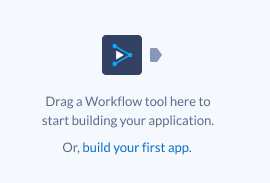
オーケストレーションキャンバスの空の状態が更新され、ユーザーが属するすべてのワークスペースにあるアプリが5つ以下の場合に、8ステップからなる「はじめてのアプリを構築」ツアーへのリンクが含まれるようになりました。
[はじめてのアプリを構築]を選択すると、8ステップのツアーが起動した状態のApp Builderに移動します。
ユーザーは、次の複数の場所からいつでも追加のリソースにアクセスできます。
ランディングページの右側のリソースペイン
ヘルプメニュー
2025年4月11日
新機能
プライベートデータ処理のためのApp Builderのサポート
App Builderでは3つのクラウドプロバイダーすべてでプライベートデータ処理(PDP)がサポートされるようになりました。これにより、App Builderの機能を厳格なデータ処理要件を持つ組織でも活用できるようになりました。
可用性の拡張: ワークスペース管理者は、PDPが適用されたワークスペースのユーザーに対して管理者UIからApp Builderを有効にできるようになりました。
シームレスなアプリ作成: 必要な権限を持つユーザーは、PDPワークスペース内で新しいアプリを作成できます。
データプライバシーの強化: PDPワークスペース内のアプリでは、データがプライベートデータプレーン内に保持されるため、外部に露出することがありません。
今回のアップデートでは、以前までのプラットフォーム制限がなくなり、コンプライアンスの高い環境での安全なアプリ開発が可能になります。
該当するクラウドプロバイダーのホワイトペーパーを必ずお読みください。
2025年4月4日
新機能
このリリースで、App Builderでは接続ベースのAlteryx Oneデータセットからの読み取りがサポートされるようになったため、リレーショナルデータベースや、ファイルベースコネクタ以外の他のソースから直接データを統合できます。この待望の機能拡張により、ユーザーはデータが存在する場所でそのままデータにアクセスできるようになり、柔軟性とユーザビリティが向上します。
接続ベースのデータセットのサポート
App Builderで接続ベースのAlteryx Oneコネクタからの読み取りがサポートされ、アプリがファイルベースのソース以外のデータセットを使用できるようになりました。データセットには、データセット読み込みツールを使用して直接アクセスできます。
ユーザーは、リレーショナルデータベースやサポートされているその他の接続ベースのソースからデータセットをロードできるため、データのアクセス性と効率が向上します。
接続ベースのデータセットを使用するDesigner Cloudワークフローのサポートは、今後の機能強化として予定されています。
ユーザー体験の改善
データセットのロードインジケーター:
シームレスなエクスペリエンスを提供するために、データの可用性をユーザーに通知するロードインジケーターがApp Builderに追加されました。
データセット読み込みツールの設定
選択したデータセットを取得する際、ロードインジケーターが表示されます。
データの読み込みが完了し、出力アンカーで使用できるようになると、インジケーターが消えます。
オーケストレーションキャンバス:
ツールがデータを処理して次に渡す間、ロードインジケーターが表示されます。
すべてのツールがデータの読み込みを完了すると、インジケーターが消えます。
インタラクティブデザインキャンバス:
データ依存要素(ドロップダウン値、テーブル行など)が使用できるようになるまで、ロードインジケーターが表示されます。
プレビュービュー:
同様の動作が適用され、データセットが正常に読み込まれたことを画面上で確認できるようになります。
データ読み込みのエラー処理
堅牢なエラー処理メカニズムがApp Builderに追加され、接続の問題が発生したときに警告が表示されるようになりました。
データセット読み込みツールの設定: 選択したデータセットへの接続に失敗した場合にエラーを表示します。
統合ツールのオーケストレーション: オーケストレーション中にデータセット接続が失敗した場合にエラーフィードバックを提供します。
インタラクティブデザインキャンバス&プレビュービュー: ツールがデータセットからデータを取得できない場合にエラーを表示します。
影響と今後の拡張
このリリースは、App Builder内の広範なデータセット接続の基盤となります。Alteryx Oneでは引き続きデータセットのサポートを強化していくため、App Builderでも追加のデータセットが自動的にサポートされるようになります。
2024年10月4日
新機能
Alteryx Oneで実行可能な分析アプリ
Cloud Executionのユーザーは、Designer Desktopで構築された分析アプリをAlteryx Oneに取り込み、Alteryx Oneライブラリの[Designer Desktop]タブから実行できるようになりました。ユーザーはパラメーターを入力して[実行]を選択すると、Cloud Executionでアプリを実行できます。結果はダウンロードリンクとして表示されます。
2024年8月16日
新機能
ツールの更新
新しいリストボックスツールを使うと、アプリ作成者は、アプリユーザーが複数選択を行えるようにできます。
次のツールに新しい「既定値」設定が加わりました。使用可能な設定のリストの一番下に表示されます。[既定値]チェックボックスは既定でオフになっています。
チェックボックス
ドロップダウン
ラジオ
テキストフィールド
ユーザーが[既定値]チェックボックスをオンにすると、使用する既定値を指定できるテキストボックスが表示されます。(チェックボックスツールにはありません)。
チェックボックスツールの場合のみ、既定の設定は「選択されていない」状態となり、「選択されていない」または「選択されている」をラジオボタンで選べます。
UXの更新
アプリUIのレイアウトを設計する場所である[デザイン]タブに気付かないユーザーへの対応として、[デザイン]タブでインタラクティブツールまたは表示ツールが利用可能な場合に、注意を引くための赤いバッジが表示されるようになりました。
停止を防ぐため、データ量が多い場合にダウンロードが一時的に1万行までに制限されます。
ワークフローツールでは、グレー表示されているワークフローにカーソルを合わせると、特定のワークフローを選択できない理由についての情報が表示されます。
解決済みの問題
App Builderが本番環境にリリースされた直後に、新しい不具合の修正や新機能を確認できるようになりました。すべてのユーザーは新しいバージョンのApp Builderをリリースと同時に入手できるため、バグ修正やその他の機能を即時に利用できます。
2024年7月19日
新機能
[デザイン]タブの新しいリンクツール
[デザイン]タブにリンクツールを追加しました。リンクツールを使用してアプリにURLを追加できます。
ユーザー体験の更新
[ダウンロード]ボタンと[実行]ボタンが、キャンバスにドラッグしたときに同じように動作するようになりました。どちらも、サイズ変更のための横方向のドラッグがあり、既定でレイアウトの2列分を使い、既定で中サイズとテキストバリアントが適用されます。
Designer Cloudの標準モードのワークフローは、ワークフローツールのワークフローピッカーでグレー表示され、選択できません。これは、アプリでの標準モードワークフローのサポートがApp Builderに追加されるまでの一時的なものです。
解決済みの問題
ドロップダウンオプションが論理的な順序で表示されないことがありました。そのため、既定の順序を追加し、探しているオプションをリストからもっと簡単に見つけられるようにしました。
重複アプリで、接続されているドロップダウンツールの列がテキスト表示の値ソースに入力されない問題を修正しました。
数値型のテキストフィールドから「値から行」ツールへの取り込みが機能しない問題を修正しました。
May 31, 2024
What's New
App Builder Available in Localization Early Preview
You can now change the App Builder UI to languages other than English. To learn more about supported languages, go to 言語サポートの早期プレビュー.
Updated User Experience
Run and Download Buttons now default to centered and take up 2 columns of Layout.
CSV Input tool has been renamed to Raw Data Input.
App Builder now redirects to the Session Expired page when a user’s session expires.
May 10, 2024
What's New
App Builder Landing Page Updates
Updated example app cards panel added to the landing page.
New Resources panel with links to provide quick access to help with App Builder:
Introduction to Alteryx App Builder: A video tutorial that gives a brief introduction to App Builder.
Academy: Alteryx Academy interactive lessons.
Help: Opens App Builder help.
Blog: Opens App Builder blogs on Alteryx Community.
Community: Opens Alteryx Community discussions about App Builder.
Documentation: Opens the App Builder release notes.
Keyboard Shortcuts: Opens the App Builderのキーボードショートカット help page.
Resolved Issues
The Output icon in the Interactive Results Grid now points the correct direction.
March 22, 2024
What's New
Updated Global Header
The global header has been updated to include new icons for Intercom and to give feedback about App Builder. The Resources Menu has also been updated to provide quick access to help with App Builder.
UX Updates
The Workflow tool configuration design has been updated. You can now scroll through a list of all of your workflows and search for a specific workflow using the search bar.
February 16, 2024
What's New
New Dataset Type Support
App Builder now supports datasets stored in PDS enabled workspaces with Azure ADLS or ABFSS storage. You can connect directly to these datasets through the Load Dataset tool or connect to Designer Cloud workflows using those datasets through the Workflow tool.
Datatype Interpretation
App Builder now handles datatype interpretation:
The Load Dataset tool uses data inferencing and always takes advantage of proper types.
Designer Cloud workflows with Input Data tools that have datatype interpretation enabled also work in App Builder, and they have the properly inferenced datatypes for the columns.
January 26, 2024
What's New
Example Applications Available in App Builder
Example applications open a fully orchestrated and designed app for a particular use case to help new App Builder users understand how to build their own app. You can make changes to the example app and save and publish those changes like any other app. For more information on example applications and to see what example applications are available, go to Get Started with App Builder.
Notification Indicator for Workflow Tools in Design Tool List
When there are tools that were added to the Orchestration of an app that are available to use in the Workflow Tools palette, a notification indicator appears on the Workflow Tools icon and next to the available tool categories. When all tools have been added to the Design canvas, the notification indicator disappears. If a tool is removed from the canvas, the notification indicator reappears to indicate there is a tool available for use.
January 17, 2024
What's New
Additional Cloud Connector Support
These connectivity based cloud connectors are available in App Builder:
AWS (S3 and S3a)
Box
OneDrive
SharePoint
Keyboard Shortcut Added for Search
A new keyboard shortcut was added to search for a tool on both the Orchestrate and Design tabs. Use Ctrl + K on PC and ⌘ + K on Mac to search for a tool.
Streamlined Configuration for Radio and Dropdown Tools
When you select a Label Source for the first time in a Radio or Dropdown tool, the selected column is also chosen to populate the Value Source. Any changes made to either source are separate and not connected to the initial default setting.
Rename Annotations
When annotations are added for connections between tools, they are saved with the app. You can also change the names of the annotations for tool connections, and the new names will be updated in the app.
Autofill Output Column for Interactive Tools
When you add one of these Interactive tools to the canvas, the Output Column field defaults to [toolname_id] unless you specify something different:
Checkbox
DateTime Input
Dropdown
Radio
Rating
Textfield
December 14, 2023
What's New
Updated Color and Style Settings
Customize any component on the Design canvas from Building Blocks or Workflow Tools with color options available in the configuration panel. To customize the colors of your components, select a Building Block or applicable Workflow Tool, then select your color options in the Color dropdown.
Updates added to Themes to customize your app colors:
Use the Colors section to set your primary, secondary, and background colors.
Use the Text section to set a default color for text.
Use the Charts section to add series colors for your charts. You can set up to 10 series colors.
November 30, 2023
What's New
Undo and Redo Actions Now Available
Undo or Redo up to 10 changes with the Undo and Redo options in the Edit menu or through common keyboard shortcuts.
PC shortcuts: Ctrl + Z to undo an action and Ctrl + Y to redo an action.
Mac shortcuts: ⌘ + Z to undo an action and ⌘ + Y to redo an action.
A message will display alerting you that you have reached the limit once you have reverted or redone all changes or reached a maximum of 10 changes.
Improvements to Save Experience
Multiple enhancements were made to improve the save experience in App Builder:
An indicator now displays while you save an app.
The save button is disabled while a save is in progress and is reenabled when the save is finished.
When you hover over an application name, the tooltip shows when the last save occurred.
New keyboard shortcuts for save are now available: Alt + S for Windows users and Ctrl + S for Mac users.
October 18, 2023
What's New
Spacing Configuration for Design Elements
Custom spacing is available for all Display and Interactive workflow tools, as well as all Building Blocks, in App Builder. Change the spacing of your app elements in the Design tab. For more information on spacing, see App Builderのコンポーネント or ワークフローツールの設計.
October 5, 2023
What's New
Application Publishing
App Creators can now publish an app to indicate it is ready for others to use.
A Creator in App Builder is able to develop Sandbox apps and promote a completed app to a published state. To publish an app for the first time or republish an app, select Publish.
Saved changes made in Sandbox apps do not appear in the published app until they are published.
Changes to the app can be made, tested, and reviewed with others before publishing or republishing the app.
Republishing an app replaces the published app with the most recent saved changes to the Sandbox app.
When an app is deleted, all versions of the app, either published or unpublished, are deleted.
You can specify a Customized Path for your app through publishing. The custom path updates both the sharing link and the iFrame URL link.
For more information on publishing apps, see App Builder User Interface.
September 1, 2023
What's New
Function Tool for App Builder
Use the new Function tool to create a new column of data that contains the result of a mathematical formula. You can use parenthesis, exponents, multiplication, division, addition, subtraction, and concatenation operators in the function.
Tool Description Flyouts
When enabled, tool descriptions appear when you hover over a tool in the Orchestrate or Design lists or over the question mark in the tool configuration window. To enable tool descriptions, use the Tool Descriptions toggle in the View menu.
New and Updated Design Components
A new Spacer Building Block component is available on the Design tab. Use Spacer to create space between other elements in the application. See Components in App Builder for more details.
The Divider Building Block component has been updated to include new configurations for Stroke Width, Color, and updated Stroke Styles. See Components in App Builder for more details.
July 21, 2023
What's New
Interactive Results Grid for App Builder
View your data in App Builder in the Interactive Results Grid, located below the canvas. To view data, select a tool or anchor in the data flow. The data from the tool or anchor is displayed in the Results Grid.
June 27, 2023
What's New
Column to Column Comparison Added to Filter Tool
Column to Column comparison has been added to the Filter tool in App Builder. Now, you can filter by comparing columns in addition to looking at values in a column.
New Aggregate Tool Added to Logic Tool Category
A new Aggregate tool is available for Data Manipulation and contains a sub-set of functionality that are similar to the Designer Desktop Summarize tool. Use the Aggregate tool to calculate cumulative values from a dataset. See Aggregate tool for more information.
May 12, 2023
This is the initial set of release notes for App Builder.
Users with App Builder Creator role permissions can create, share and use apps in App Builder. Sharing requires access to all dependent resources, such as workflows and datasets.
What's New
Full Datasets from File-based Workflow Integration and Dataset Inputs
Creators can build applications with full file-based datasets from Designer Cloudworkflows or datasets from the Alteryx OneLibrary, or use a combination of both.
Data Visualizations
Visualize data with interactive Area Charts, Bar Charts, Line Charts, Scatterplots, and Tables.
Set Variables
Make workflows, datasets, and interface tools dynamic with a redesigned Variable experience.
Browser or Mobile
Access your finished application on any device with a browser.