App Builder 的发行说明
注意
App Builder 是 ADS 上提供的一款新兴且持续演进的产品。我们不断完善和提升您的体验,因此功能如有更改,不再另行通知。感谢您的理解,并欢迎您在我们持续优化 App Builder 的过程中,通过 Alteryx 社区提供反馈意见!
App Builder 托管于 Alteryx One。有关基础平台的详细信息,请参阅 Alteryx One Platform 的发行说明。
2025 年 4 月 25 日
改进了新用户入门体验
App Builder 增强了新用户问候体验。
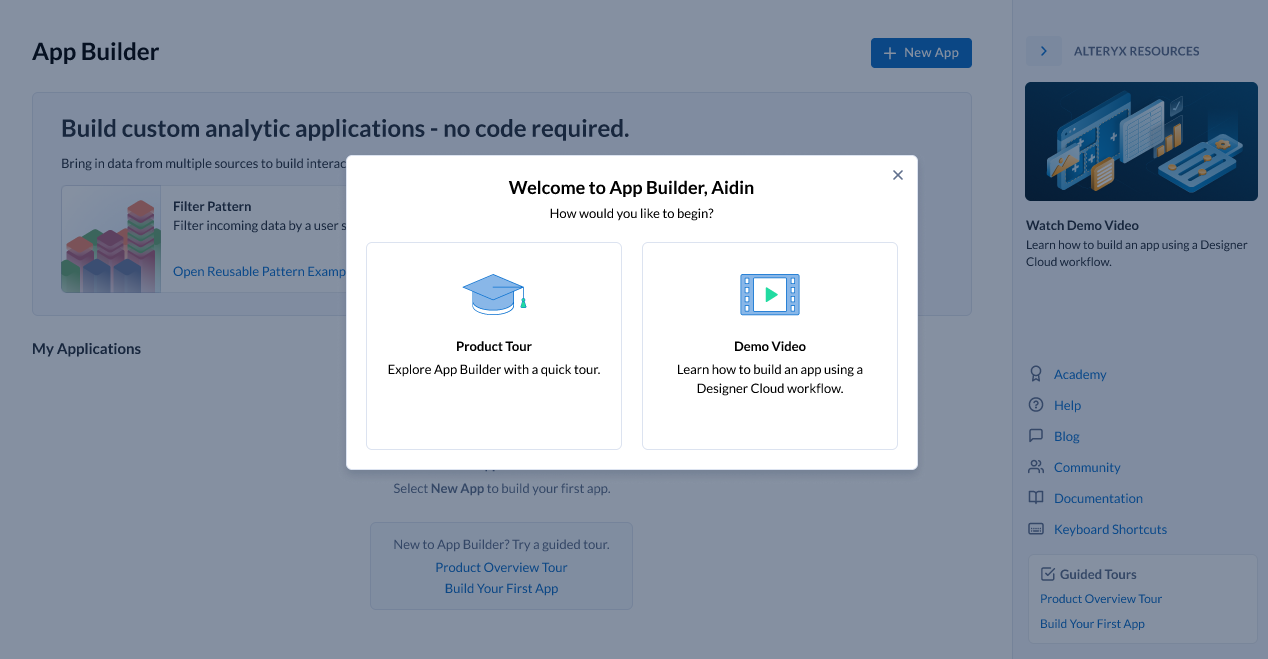
新增功能
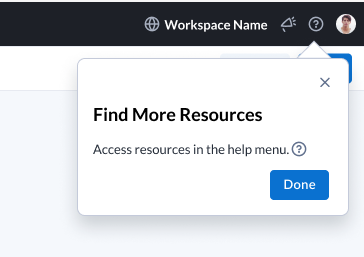
首次使用的用户会看到一个新对话框,可从两个选项中选择以了解更多信息,包括产品导览或简短视频。当前工作区中无任何应用程序的用户,将在登录页面看到两个链接,可访问产品概述导览或构建您的第一个应用程序。关闭任意一个导览后,会弹出最终提示窗口,指向帮助菜单,用户可在其中查找更多资源。
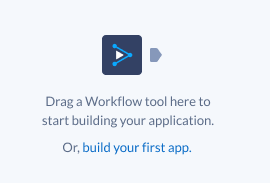
如果用户在其所属的所有工作区中拥有 5 个或更少应用程序,编排画布空状态已更新,将包含“构建您自己的应用程序”八步导览链接。
构建您的第一个应用程序会将用户引导至 App Builder,并启动八步式 WalkMe 导览。
用户可从多个位置随时访问更多资源:
登录页面右侧资源窗格,
“帮助”菜单。
2025 年 4 月 11 日
新增功能
App Builder 对私有数据处理的支持
App Builder 现在支持所有三家云提供商的私有数据处理 (PDP),使具有严格数据处理要求的组织能够利用其功能。
扩展可用性:工作区管理员现在可通过管理 UI,为配置了 PDP 的工作区中的用户启用 App Builder。
无缝应用程序创建:具有必要权限的用户可在 PDP 工作区内创建新应用程序。
增强数据隐私:PDP 工作区中的应用程序可确保数据保持在私有数据平面内,不会外泄。
此更新消除了之前的平台限制,并支持在高合规性环境中进行安全的应用程序开发。
请务必阅读适用云提供商的白皮书:
2025 年 4 月 4 日
新增功能
在此版本中,App Builder 新增了对基于连接的 Alteryx One 数据集的读取支持,允许用户直接从关系数据库及基于文件的连接器以外的其他来源集成数据。这一期待已久的增强功能可确保客户能够访问其存储位置的数据,从而提高灵活性和可用性。
基于连接的数据集支持
App Builder 现在可从基于连接的 Alteryx One 连接器读取数据,使应用程序能够使用基于文件的来源以外的数据集。可通过加载数据集工具直接访问这些数据集。
用户可从关系数据库及其他支持的基于连接的来源加载数据集,从而提高数据的可访问性和效率。
对使用基于连接的数据集的 Designer Cloud 工作流的支持,将通过未来的功能增强推出。
用户体验改进
数据集加载指示器
为提供无缝体验,App Builder 现在新增了加载指示器,用于告知用户数据可用状态:
加载数据集工具配置:
检索选定数据集时显示加载指示器。
当数据完全加载并在输出锚点可用时,指示器消失。
编排画布:
工具处理和传递数据时,将显示加载指示器。
所有工具完成数据加载后,指示器即消失。
交互式设计画布:
在数据相关元素(例如下拉菜单值、表格行)可用之前,将显示加载指示器。
预览视图:
适用类似机制,确保用户在数据集成功加载时看到视觉确认。
数据加载的错误处理
App Builder 现在具备强大的错误处理机制,可在出现连接问题时向用户发出警报:
加载数据集工具配置:无法连接到选定数据集时显示错误信息。
集成工具编排:编排过程中数据集连接失败时,提供错误反馈。
交互式设计画布及预览视图:如果工具无法从数据集中检索数据,将显示错误信息。
影响与未来功能增强
此版本为 App Builder 中更广泛的数据集连接奠定了基础。随着 Alteryx One 数据集支持的持续增强,App Builder 也将自动支持更多数据集。
2024 年 10 月 4 日
新增功能
Alteryx One 可执行分析应用程序
云执行用户现在可将使用 Designer Desktop 构建的分析应用程序导入 Alteryx One,并从 Alteryx One库的 Designer Desktop 选项卡中运行该应用程序。用户可填写参数并选择运行,通过云执行功能运行应用程序。结果将以下载链接的形式提供。
2024 年 8 月 16 日
新增功能
工具更新
新增列表框工具,允许应用程序创建者为应用程序用户启用多选功能。
以下工具新增了“默认值”配置项,该配置项位于可用配置列表的底部。默认情况下,“默认值”未选中。
复选框
下拉列表
单选
文本字段
当用户选中“默认值”复选框时,将出现一个文本框,用户可在其中指定要使用的默认值。(复选框无此配置项)。
默认设置为“未选中”(特定于复选框工具),用户可在“未选中”或“已选中”单选按钮之间切换。
用户体验更新
部分用户未注意到“设计”选项卡(应用程序界面布局在此选项卡中设计),因此当“设计”选项卡上有可用的交互式工具或显示工具时,将显示红色徽章以吸引注意。
为防止服务中断,下载功能暂时限制为最多 10,000 行数据(适用于较大数据量场景)。
使用工作流工具时,将鼠标悬停在灰显的工作流上,会显示无法选择该工作流的原因说明。
已修复的问题
现在,App Builder 正式发布后,您可立即查看新的缺陷修复内容或新增功能。所有用户将在 App Builder 发布后立即获得新版本,以便及时获取缺陷修复和其他功能。
2024 年 7 月 19 日
新增功能
“设计”选项卡中新增的链接工具
已将链接工具添加至“设计”选项卡。使用链接工具可向您的应用程序添加 URL。
更新了用户体验
下载按钮和运行按钮现在拖动到画布上时的行为保持一致。两者均支持水平拖动调整大小,默认占用 2 列布局,默认设置为“中等大小”和“文本变体”。
Designer Cloud 中的标准模式工作流在工作流工具的工作流选取器中呈灰色显示,无法选择。这是临时限制,App Builder 为应用程序中的标准模式工作流添加支持后即可解除。
已修复的问题
下拉选项有时未按逻辑顺序显示。新增默认排序功能,方便您在列表中快速找到所需选项。
修复了“应用程序重复时,文本显示的值源未填充已连接下拉工具中的列”的问题。
修复了“值转行功能中数字类型文本字段无法正常工作”的问题。
May 31, 2024
What's New
App Builder Available in Localization Early Preview
You can now change the App Builder UI to languages other than English. To learn more about supported languages, go to 语言支持早期预览版.
Updated User Experience
Run and Download Buttons now default to centered and take up 2 columns of Layout.
CSV Input tool has been renamed to Raw Data Input.
App Builder now redirects to the Session Expired page when a user’s session expires.
May 10, 2024
What's New
App Builder Landing Page Updates
Updated example app cards panel added to the landing page.
New Resources panel with links to provide quick access to help with App Builder:
Introduction to Alteryx App Builder: A video tutorial that gives a brief introduction to App Builder.
Academy: Alteryx Academy interactive lessons.
Help: Opens App Builder help.
Blog: Opens App Builder blogs on Alteryx Community.
Community: Opens Alteryx Community discussions about App Builder.
Documentation: Opens the App Builder release notes.
Keyboard Shortcuts: Opens the App Builder 中的键盘快捷键 help page.
Resolved Issues
The Output icon in the Interactive Results Grid now points the correct direction.
March 22, 2024
What's New
Updated Global Header
The global header has been updated to include new icons for Intercom and to give feedback about App Builder. The Resources Menu has also been updated to provide quick access to help with App Builder.
UX Updates
The Workflow tool configuration design has been updated. You can now scroll through a list of all of your workflows and search for a specific workflow using the search bar.
February 16, 2024
What's New
New Dataset Type Support
App Builder now supports datasets stored in PDS enabled workspaces with Azure ADLS or ABFSS storage. You can connect directly to these datasets through the Load Dataset tool or connect to Designer Cloud workflows using those datasets through the Workflow tool.
Datatype Interpretation
App Builder now handles datatype interpretation:
The Load Dataset tool uses data inferencing and always takes advantage of proper types.
Designer Cloud workflows with Input Data tools that have datatype interpretation enabled also work in App Builder, and they have the properly inferenced datatypes for the columns.
January 26, 2024
What's New
Example Applications Available in App Builder
Example applications open a fully orchestrated and designed app for a particular use case to help new App Builder users understand how to build their own app. You can make changes to the example app and save and publish those changes like any other app. For more information on example applications and to see what example applications are available, go to Get Started with App Builder.
Notification Indicator for Workflow Tools in Design Tool List
When there are tools that were added to the Orchestration of an app that are available to use in the Workflow Tools palette, a notification indicator appears on the Workflow Tools icon and next to the available tool categories. When all tools have been added to the Design canvas, the notification indicator disappears. If a tool is removed from the canvas, the notification indicator reappears to indicate there is a tool available for use.
January 17, 2024
What's New
Additional Cloud Connector Support
These connectivity based cloud connectors are available in App Builder:
AWS (S3 and S3a)
Box
OneDrive
SharePoint
Keyboard Shortcut Added for Search
A new keyboard shortcut was added to search for a tool on both the Orchestrate and Design tabs. Use Ctrl + K on PC and ⌘ + K on Mac to search for a tool.
Streamlined Configuration for Radio and Dropdown Tools
When you select a Label Source for the first time in a Radio or Dropdown tool, the selected column is also chosen to populate the Value Source. Any changes made to either source are separate and not connected to the initial default setting.
Rename Annotations
When annotations are added for connections between tools, they are saved with the app. You can also change the names of the annotations for tool connections, and the new names will be updated in the app.
Autofill Output Column for Interactive Tools
When you add one of these Interactive tools to the canvas, the Output Column field defaults to [toolname_id] unless you specify something different:
Checkbox
DateTime Input
Dropdown
Radio
Rating
Textfield
December 14, 2023
What's New
Updated Color and Style Settings
Customize any component on the Design canvas from Building Blocks or Workflow Tools with color options available in the configuration panel. To customize the colors of your components, select a Building Block or applicable Workflow Tool, then select your color options in the Color dropdown.
Updates added to Themes to customize your app colors:
Use the Colors section to set your primary, secondary, and background colors.
Use the Text section to set a default color for text.
Use the Charts section to add series colors for your charts. You can set up to 10 series colors.
November 30, 2023
What's New
Undo and Redo Actions Now Available
Undo or Redo up to 10 changes with the Undo and Redo options in the Edit menu or through common keyboard shortcuts.
PC shortcuts: Ctrl + Z to undo an action and Ctrl + Y to redo an action.
Mac shortcuts: ⌘ + Z to undo an action and ⌘ + Y to redo an action.
A message will display alerting you that you have reached the limit once you have reverted or redone all changes or reached a maximum of 10 changes.
Improvements to Save Experience
Multiple enhancements were made to improve the save experience in App Builder:
An indicator now displays while you save an app.
The save button is disabled while a save is in progress and is reenabled when the save is finished.
When you hover over an application name, the tooltip shows when the last save occurred.
New keyboard shortcuts for save are now available: Alt + S for Windows users and Ctrl + S for Mac users.
October 18, 2023
What's New
Spacing Configuration for Design Elements
Custom spacing is available for all Display and Interactive workflow tools, as well as all Building Blocks, in App Builder. Change the spacing of your app elements in the Design tab. For more information on spacing, see App Builder 中的组件 or 设计工作流工具.
October 5, 2023
What's New
Application Publishing
App Creators can now publish an app to indicate it is ready for others to use.
A Creator in App Builder is able to develop Sandbox apps and promote a completed app to a published state. To publish an app for the first time or republish an app, select Publish.
Saved changes made in Sandbox apps do not appear in the published app until they are published.
Changes to the app can be made, tested, and reviewed with others before publishing or republishing the app.
Republishing an app replaces the published app with the most recent saved changes to the Sandbox app.
When an app is deleted, all versions of the app, either published or unpublished, are deleted.
You can specify a Customized Path for your app through publishing. The custom path updates both the sharing link and the iFrame URL link.
For more information on publishing apps, see App Builder User Interface.
September 1, 2023
What's New
Function Tool for App Builder
Use the new Function tool to create a new column of data that contains the result of a mathematical formula. You can use parenthesis, exponents, multiplication, division, addition, subtraction, and concatenation operators in the function.
Tool Description Flyouts
When enabled, tool descriptions appear when you hover over a tool in the Orchestrate or Design lists or over the question mark in the tool configuration window. To enable tool descriptions, use the Tool Descriptions toggle in the View menu.
New and Updated Design Components
A new Spacer Building Block component is available on the Design tab. Use Spacer to create space between other elements in the application. See Components in App Builder for more details.
The Divider Building Block component has been updated to include new configurations for Stroke Width, Color, and updated Stroke Styles. See Components in App Builder for more details.
July 21, 2023
What's New
Interactive Results Grid for App Builder
View your data in App Builder in the Interactive Results Grid, located below the canvas. To view data, select a tool or anchor in the data flow. The data from the tool or anchor is displayed in the Results Grid.
June 27, 2023
What's New
Column to Column Comparison Added to Filter Tool
Column to Column comparison has been added to the Filter tool in App Builder. Now, you can filter by comparing columns in addition to looking at values in a column.
New Aggregate Tool Added to Logic Tool Category
A new Aggregate tool is available for Data Manipulation and contains a sub-set of functionality that are similar to the Designer Desktop Summarize tool. Use the Aggregate tool to calculate cumulative values from a dataset. See Aggregate tool for more information.
May 12, 2023
This is the initial set of release notes for App Builder.
Users with App Builder Creator role permissions can create, share and use apps in App Builder. Sharing requires access to all dependent resources, such as workflows and datasets.
What's New
Full Datasets from File-based Workflow Integration and Dataset Inputs
Creators can build applications with full file-based datasets from Designer Cloudworkflows or datasets from the Alteryx OneLibrary, or use a combination of both.
Data Visualizations
Visualize data with interactive Area Charts, Bar Charts, Line Charts, Scatterplots, and Tables.
Set Variables
Make workflows, datasets, and interface tools dynamic with a redesigned Variable experience.
Browser or Mobile
Access your finished application on any device with a browser.