Box
Verbindungstyp | Alteryx-Tool. Die aktuellste Version ist im Alteryx Marketplace verfügbar. |
Typ der Unterstützung | Lesen und Schreiben |
Versionshinweise zu Konnektor 1.0.0 (Python)
Kompatibilität mit Designer (noch klären)
Neuigkeiten
Brandneue Funktionen
The Box connector defaults Time and DateTime precision to milliseconds to avoid extra trailing zeros, while still supporting nanosecond resolution when required by the workflow.
Verhaltensänderungen
We've disabled the right-click context menu in Designer for the Box tools to prevent unintended actions.
Behobene Probleme
Behoben Konnektor-Version xxxx.x.x.xxxxx | |
|---|---|
ID | Beschreibung |
TPM-5038 | Newly created files in the Box tools inherit the previously selected filename when saved with any extension. |
TPM-5006 | Selecting Enable Dry Run in the Box Input tool (version 2.5.6) using a DCM connection with JWT authentication causes an error. |
TPM-4984 | The Box connector version 2.5.7 doesn’t recognize YXDB files. |
TPM-4948 | An error occurs when uploading a file using the Box tools. |
TPM-4853 | Special characters in the proxy password cause an error when setting up a manual proxy server for the Box tools. |
TPM-4782 | Secret values are exposed in the returned JSON in the Designer HTML Developer Tools for the Box tools. |
TPM-4754 | The Box Input tool returns a "list index out of range" error. |
TPM-4645 | The Box DCM connection returns an invalid access token error after 24 hours. |
TPM-4396 | The Box Input tool doesn’t function properly with DCM. |
TPM-4239 | The SharePoint Input (version 2.4.2) and Box Input (version 2.5.2) tools don’t return metadata for YXDB files that contain only a heading row. |
TPM-4192 | File name breadcrumbs don’t appear correctly in the Box UI. |
TPM-4191 | The Box Input tool version 2.5.6 on Python 3.10 adds extra decimal values to datetime fields. |
TPM-3832 | The SharePoint Input tool version 2.6.2 returns a "Python int too large to convert to C long" error. |
TPM-3334 | After upgrading to SDK version 2.4.0, null datetime values appear as NaT in CSV files using the Box tools. |
TPM-3266 | The SharePoint Input (version 2.4.2) and Box Input (version 2.5.2) tools don’t return metadata for CSV and XLSX files that contain only a heading row. |
Bekannte Probleme
Bekannt Konnektor-Version xxxx.x.x.xxxxx | |
|---|---|
ID | Beschreibung |
JIRA-ID | Problembeschreibung |
Zurückgezogene Probleme
Abgebrochen Konnektor-Version xxxx.x.x.xxxxx | |
|---|---|
ID | Beschreibung |
TPM-4190 | The dry run feature doesn’t work in the Box Input tool version 2.5.6. |
TPM-4049 | The Box Output tool returns errors when writing large XLSX files. |
TPM-3758 | The Box Output tool doesn’t retain selected fields as expected. |
TPM-3634 | File paths don’t update when files are deleted from the Box server using a browser. |
TPM-3479 | In Box version 2.5.5 (Python 3.8), using the 'Download file locally for later processing' feature with an empty or invalid location doesn’t work as expected in either scenario. |
TPM-3477 | INT data types upload as FLOAT types when viewed in the Box browser. |
TPM-3435 | The Box Output tool maps incorrect data types for XLSX files. |
TPM-2871 | The Box DCM connection returns an invalid access token error after 24 hours. |
TPM-2792 | The Box Input tools return a "Communication error: Failed to write Control In message" during validation. |
TPM-2267 | The Box Output tool writes an empty YXDB file if a field is of the DateTime data type. |
TPM-2246 | The Box Output tool displays an unclear error message for invalid CSV files. |
TPM-2133 | Field names are not automatically voiced in the Box tools. |
TPM-1568 | The Box tools experience a significant lag when users click away from the tool. |
Version | Beschreibung |
v2.5.6 |
|
v2.5.5 |
|
v2.5.4 |
|
v2.5.2 |
Bekanntes Problem
Alteryx Server erfordert den Wert AllowAll aus den SDK-Zugriffsmodus-Einstellungen. |
v2.5.1 |
Bekanntes Problem
|
v2.5.0 |
Bekanntes Problem
|
v2.4.0 |
|
v2.3.0 |
|
V2.2.0 |
|
v2.1.1 |
|
v1.0.0 |
|
Alteryx-Tools für die Verbindung

Verwenden Sie den Box-Konnektor zum Ausführen, Planen und Veröffentlichen von Workflows aus Designer unter Verwendung von Dateien, die in Ihrem Box-Arbeitsbereich gespeichert sind. Unterstützte Dateitypen sind XLSX, CSV und YXDB.
Achtung
Desktop Automation (Planer) wird von diesem Konnektor nicht unterstützt.
Data Connection Manager
Die Box-Tools ab Version 2.5.0 unterstützen Data Connection Manager für eine einfachere und sicherere Speicherung Ihrer Anmeldedaten. Stellen Sie eine Verbindung zu Box her, um die gespeicherten Anmeldedaten einfach in Workflows wiederverwenden zu können, die Box-Tools enthalten. Alteryx Server benötigt gespeicherte Anmeldedaten, um die veröffentlichten Workflows erfolgreich ausführen zu können.
AMP Engine aktivieren
Stellen Sie sicher, dass die AMP Engine für Workflows aktiviert ist, die Box-Tools ab Version 2.5.0 enthalten, um das volle Potenzial von Designer auszuschöpfen.
Registrierung der Box-App
Melden Sie sich mit Ihren Box-Anmeldedaten unter https://alteryx.app.box.com/developers/console an.
Wählen Sie Neue App erstellen aus.
Wählen Sie Benutzerdefinierte App aus.
Wählen Sie unter Authentifizierungsmethode die Option Benutzerauthentifizierung (OAuth 2.0) aus. Geben Sie den App-Namen ein, und wählen Sie App erstellen aus.
Wählen Sie auf der Registerkarte Konfiguration unter App-Geltungsbereiche die Option Alle in Box gespeicherten Dateien und Ordner schreiben aus, um der App Berechtigungen zu erteilen.
Wählen Sie Änderungen speichern aus.
Um ein neues Entwicklertoken zu generieren, wählen Sie Widerrufen und dann Entwicklertoken generieren aus.
Zur Authentifizierung können Sie die Client-ID und das Client-Geheimnis aus den OAuth 2.0-Anmeldedaten verwenden.
Benutzerdefinierte Anwendungseinrichtung
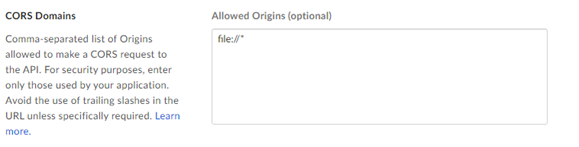
Um ein Box CORS-Problem bei der Verwendung der App mit OAuth-Authentifizierung oder Access Token und JWT zu vermeiden, empfiehlt es sich, eine benutzerdefinierte Konfiguration zu verwenden:
Box-App mit OAuth-Authentifizierung:
Fügen Sie URI umleiten https://cef.alteryx.com/designer/oauthcallback hinzu, um das CORS-Problem im CEF-Fenster zu beheben.

Geben Sie
file://*für zulässige Ursprünge ein.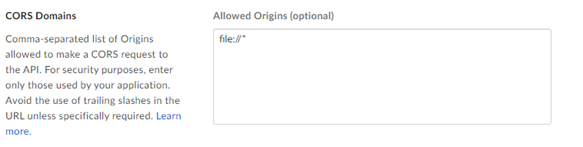
Box-App mit Access Token und JWT-Authentifizierung:
Geben Sie
file://*für zulässige Ursprünge ein.