Box
连接类型 | Alteryx 工具。最新版本可从 Alteryx Marketplace 获得。 |
支持类型 | 读取和写入 |
连接器 1.0.0 发行说明 (Python)
与 Designer 的兼容性(待讨论)
新增功能
全新功能!
The Box connector defaults Time and DateTime precision to milliseconds to avoid extra trailing zeros, while still supporting nanosecond resolution when required by the workflow.
行为变化
We've disabled the right-click context menu in Designer for the Box tools to prevent unintended actions.
已修复的问题
已修复 连接器发行版本 xxxx.x.x.xxxxx | |
|---|---|
ID | 描述 |
TPM-5038 | Newly created files in the Box tools inherit the previously selected filename when saved with any extension. |
TPM-5006 | Selecting Enable Dry Run in the Box Input tool (version 2.5.6) using a DCM connection with JWT authentication causes an error. |
TPM-4984 | The Box connector version 2.5.7 doesn’t recognize YXDB files. |
TPM-4948 | An error occurs when uploading a file using the Box tools. |
TPM-4853 | Special characters in the proxy password cause an error when setting up a manual proxy server for the Box tools. |
TPM-4782 | Secret values are exposed in the returned JSON in the Designer HTML Developer Tools for the Box tools. |
TPM-4754 | The Box Input tool returns a "list index out of range" error. |
TPM-4645 | The Box DCM connection returns an invalid access token error after 24 hours. |
TPM-4396 | The Box Input tool doesn’t function properly with DCM. |
TPM-4239 | The SharePoint Input (version 2.4.2) and Box Input (version 2.5.2) tools don’t return metadata for YXDB files that contain only a heading row. |
TPM-4192 | File name breadcrumbs don’t appear correctly in the Box UI. |
TPM-4191 | The Box Input tool version 2.5.6 on Python 3.10 adds extra decimal values to datetime fields. |
TPM-3832 | The SharePoint Input tool version 2.6.2 returns a "Python int too large to convert to C long" error. |
TPM-3334 | After upgrading to SDK version 2.4.0, null datetime values appear as NaT in CSV files using the Box tools. |
TPM-3266 | The SharePoint Input (version 2.4.2) and Box Input (version 2.5.2) tools don’t return metadata for CSV and XLSX files that contain only a heading row. |
已知问题
已知 连接器发行版本 xxxx.x.x.xxxxx | |
|---|---|
ID | 描述 |
JIRA-ID | 问题描述 |
已取消的问题
已取消 连接器发行版本 xxxx.x.x.xxxxx | |
|---|---|
ID | 描述 |
TPM-4190 | The dry run feature doesn’t work in the Box Input tool version 2.5.6. |
TPM-4049 | The Box Output tool returns errors when writing large XLSX files. |
TPM-3758 | The Box Output tool doesn’t retain selected fields as expected. |
TPM-3634 | File paths don’t update when files are deleted from the Box server using a browser. |
TPM-3479 | In Box version 2.5.5 (Python 3.8), using the 'Download file locally for later processing' feature with an empty or invalid location doesn’t work as expected in either scenario. |
TPM-3477 | INT data types upload as FLOAT types when viewed in the Box browser. |
TPM-3435 | The Box Output tool maps incorrect data types for XLSX files. |
TPM-2871 | The Box DCM connection returns an invalid access token error after 24 hours. |
TPM-2792 | The Box Input tools return a "Communication error: Failed to write Control In message" during validation. |
TPM-2267 | The Box Output tool writes an empty YXDB file if a field is of the DateTime data type. |
TPM-2246 | The Box Output tool displays an unclear error message for invalid CSV files. |
TPM-2133 | Field names are not automatically voiced in the Box tools. |
TPM-1568 | The Box tools experience a significant lag when users click away from the tool. |
版本 | 描述 |
v2.5.6 |
|
v2.5.5 |
|
v2.5.4 |
|
v2.5.2 |
已知问题
Alteryx Server 需要将“SDK 访问模式”设置设为 AllowAll 值。 |
v2.5.1 |
已知问题
|
v2.5.0 |
已知问题
|
v2.4.0 |
|
v2.3.0 |
|
v2.2.0 |
|
v2.1.1 |
|
v1.0.0 |
|
用于连接的 Alteryx 工具

有了 Box 连接器,即可在 Designer 中使用存储在 Box 工作区中的文件运行、计划和发布工作流。支持的文件类型包括 XLSX、CSV 和 YXDB。
小心
此连接器不支持桌面自动化(计划程序)。
数据连接管理器
Box 工具 2.5.0 版及更高版本支持数据连接管理器,以便更轻松、更安全地存储凭证。创建到 Box 的连接,并在包含 Box 工具的工作流中轻松重复使用存储的凭证。Alteryx Server 需要存储的凭证才能成功运行已发布的工作流。
启用 AMP Engine
确保您为包含 Box 工具 2.5.0 版及更高版本的工作流启用了 AMP Engine,以充分利用 Designer 功能的潜力。
注册 Box 应用程序
使用您的 Box 凭证登录 https://alteryx.app.box.com/developers/console。
选择创建新应用程序。
选择自定义应用程序。
在身份验证方法中,选择用户身份验证 (OAuth 2.0)。输入应用程序名称并选择创建应用程序。
在应用程序范围的配置选项卡上,选择写入存储在 Box 中的所有文件和文件夹以向应用程序提供权限。
选择保存更改。
要生成新的开发人员令牌,请选择撤销,然后选择生成开发人员令牌。
您可以使用 OAuth 2.0 凭证中的客户端 ID 和客户端密码进行身份验证。
自定义应用程序设置
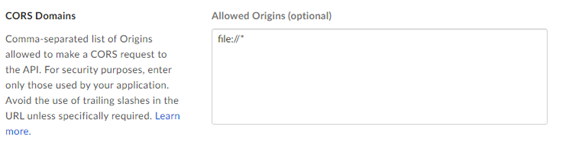
要避免在使用具有 OAuth 身份验证或访问令牌和 JWT 的应用程序时出现 Box CORS 问题,请使用自定义配置:
具有 OAuth 身份验证的 Box 应用程序:
添加重定向 URI https://cef.alteryx.com/designer/oauthcallback 以解决 CEF 窗口 CORS 问题。

为允许的来源输入
file://*。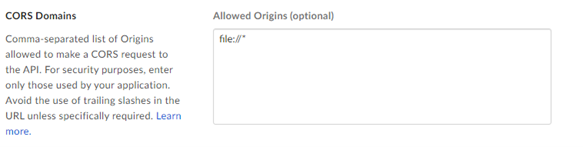
具有访问令牌和 JWT 身份验证的 Box 应用程序:
为允许的来源输入
file://*。