Marketplace 插件
除了通过 Alteryx Marketplace 下载,您现在可以直接通过 Alteryx Designer 下载并安装 Alteryx 制作的数据连接器工具和附加组件。
下载并安装附加组件
要直接通过 Designer 下载和安装 Alteryx 数据连接器和其他附加组件,请按照以下步骤操作:
在 Designer 中,转到附加组件 > 管理 Marketplace 插件,以打开 Marketplace 插件窗口。
找到要安装的附加组件或连接器工具。如果需要,您可以使用搜索栏,也可以选择名称列按字母顺序对工具列表进行排序。找到附加组件后,使用克拉图标展开并查看描述、上传日期、当前版本以及 Alteryx Marketplace 的链接。
选择安装按钮以下载附加组件。如果您之前安装了该附加组件,按钮文本将显示为已安装或更新。如果有新版本的附加组件可用,则该按钮处于活跃状态,您可以选择“更新”进行安装(如果新版本尚不可用,则该按钮处于非活跃状态)。
您可以同时安装多个附加组件。对多个附加组件选择安装或更新按钮,将安装作业加入队列。第一个附加组件安装完成后,下一个附加组件安装过程就会开始。
更新附加组件
如果您以前安装了附加组件,您可以通过更新按钮(如果可用)下载新版本。请务必注意,此操作不会覆盖现有附加组件。更新之后,除了您已经安装的任何旧版本之外,还会单独下载一个新版本。
此外,此更新功能仅识别通过 Designer 中的“Marketplace 插件”窗口安装的有更新可用的附加组件。如果您手动安装了附加组件 YXI,则不会通过“Marketplace 插件”窗口显示更新选项(即使有可用更新)。
选择“安装”或“更新”后,安装程序窗口将启动。您可以在这里获取一些元数据,包括类别、版本、作者和描述。
管理员安装
请注意,当以管理员身份运行 Designer 时,管理员可以为所有用户安装附加组件。要为单个用户安装,请运行 Designer 的非管理员版本。
撤消对附加组件菜单的访问权限
您的组织可能制定了相应策略,以限制用户下载到其计算机的能力。如果您遇到这种情况,您可以从 Designer 中移除附加组件菜单,这样用户就无法从 Alteryx Marketplace 访问和下载项目。按照以下步骤移除附加组件菜单:
找到
RuntimeSettings.xml文件,该文件位于..\Alteryx\bin\RuntimeData。滚动到文件的
<Designer>部分,并找到<EnableAddOns>True</EnableAddOns>标记。默认值为True。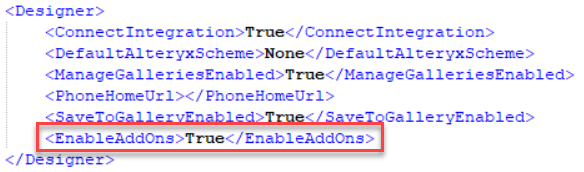
将值设为
False并保存 RuntimeSettings.xml 文件。重新启动 Designer,附加组件菜单即无法再访问。要再次启用菜单,请重复上述过程并将该值设置回
True。
可通过 Designer 安装的 Marketplace 插件
Review the information below for version-specific notes about Marketplace Add-Ons available via Designer:
In the initial 2024.1 release, please note that only the most recent version of the tool is available for installation via Designer. If you need to install an older version of one of the tools, go to the tool's page on Alteryx Marketplace.
Additionally, with the 2024.1 release, Alteryx has upgraded its version of Python to v3.10.13 (previously v3.8.16). Some tools might not be immediately updated to be compatible with the Python upgrade. If you try to use an older version of a tool (downloaded directly from Marketplace) with Designer 2024.1, you might encounter problems. Go to the Python 3.10 Upgrade FAQ for up-to-date information.
As of the 2024.2 release, the Marketplace Add-Ons window in Designer allows you to install only add-ons compatible with your Designer version.