Note di release di App Builder
Nota
App Builder è un prodotto nuovo e in evoluzione disponibile con ADS. La funzionalità è soggetta a modifiche senza preavviso al fine di perfezionare e migliorare costantemente l'esperienza degli utenti. Ti ringraziamo per la comprensione e ti invitiamo a fornire un feedback nella community Alteryx per aiutarci a migliorare App Builder.
App Builder è in hosting su Alteryx One. Per ulteriori informazioni sulla piattaforma sottostante, vai alle Note di release per Alteryx One Platform.
25 aprile 2025
Miglioramento dell'esperienza di onboarding dei nuovi utenti
L'esperienza di accoglienza dei nuovi utenti di App Builder è stata migliorata.
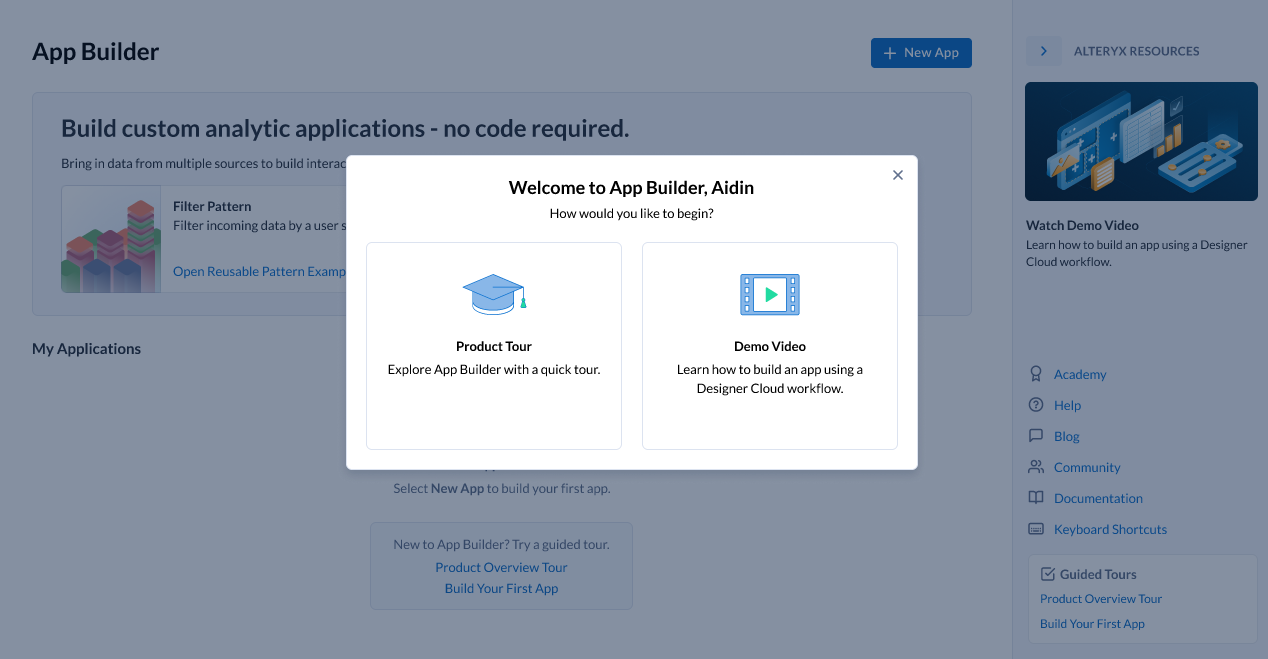
Novità
Gli utenti che utilizzano App Builder per la prima volta vengono accolti da una nuova finestra di dialogo, che offre due opzioni per scoprire di più, ovvero un tour del prodotto e un breve video. Se l'utente non dispone di app nello spazio di lavoro corrente, nella pagina di destinazione vengono visualizzati due collegamenti che consentono di accedere ai tour Panoramica del prodotto e Crea la tua prima app. Alla fine di entrambi i tour viene visualizzato un pop-up che punta al menu della Guida, in cui è possibile trovare altre risorse.

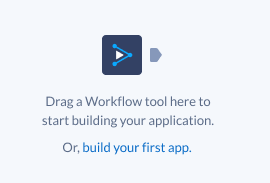
Lo stato Vuoto dell'area di disegno Orchestrazione è stato aggiornato e ora, se l'utente dispone di 5 app o meno in tutti gli spazi di lavoro a cui appartiene, include un collegamento al tour in 8 passaggi Crea la tua prima app.
Crea la tua prima app è un tour WalkMe in 8 passaggi, che spiega all'utente come utilizzare App Builder.
Le risorse aggiuntive sono accessibili in qualsiasi momento da diverse posizioni:
Riquadro Risorse sul lato destro della pagina di destinazione
Menu della Guida
11 aprile 2025
Novità
Supporto di App Builder per l'elaborazione di dati privati
Ora App Builder supporta l'elaborazione privata dei dati (PDP, Private Data Processing) in tutti e tre i provider di servizi cloud, consentendo di sfruttare le sue funzionalità anche alle aziende con requisiti di gestione dati molto rigorosi.
Disponibilità estesa: ora gli amministratori degli spazi di lavoro possono abilitare App Builder per gli utenti negli spazi di lavoro configurati con PDP, tramite l'interfaccia utente di amministrazione.
Creazione fluida delle app: gli utenti che dispongono delle autorizzazioni necessarie possono creare nuove app all'interno di uno spazio di lavoro PDP.
Massima riservatezza dei dati: all'interno di uno spazio di lavoro PDP, le app assicurano il mantenimento dei dati all'interno del piano dati privato, evitando qualunque esposizione esterna.
Questo aggiornamento elimina le limitazioni precedenti della piattaforma, consentendo lo sviluppo sicuro delle applicazioni negli ambienti con requisiti di conformità elevati.
Assicurati di leggere il white paper dedicato al provider di servizi cloud applicabile:
4 aprile 2025
Novità
Con questa versione, App Builder introduce il supporto per la lettura dei dataset Alteryx One basati sulla connettività, consentendo agli utenti di integrare i dati direttamente dai database relazionali e da altre origini, oltre che dai connettori basati su file. Questo miglioramento tanto atteso garantisce ai clienti la possibilità di accedere ai dati nella posizione in cui risiedono, migliorandone i livelli di flessibilità e usabilità.
Supporto dei dataset basati sulla connettività
Ora App Builder è in grado di leggere dai connettori Alteryx One basati sulla connettività, permettendo alle app di utilizzare anche altri dataset, oltre alle origini basate su file. È possibile accedere direttamente a tali dati utilizzando lo strumento "Carica dataset".
Gli utenti possono caricare dataset dai database relazionali e dalle altre origini basate sulla connettività supportate, migliorando l'accessibilità e l'efficienza dei dati.
Il supporto per i flussi di lavoro Designer Cloud che utilizzano dataset basati sulla connettività verrà introdotto in futuro.
Miglioramenti dell'esperienza utente
Indicatori di caricamento dei dataset
Per offrire un'esperienza ottimale, ora App Builder fornisce indicatori di caricamento che segnalano la disponibilità dei dati agli utenti:
Configurazione dello strumento Carica dataset:
Visualizza un indicatore di caricamento durante il recupero di un dataset selezionato.
L'indicatore scompare quando i dati risultano completamente caricati e disponibili nell'ancoraggio di output.
Area di disegno Orchestrazione:
Gli indicatori di caricamento vengono visualizzati mentre gli strumenti elaborano e trasmettono i dati.
Quando tutti gli strumenti hanno completato il caricamento dei dati, gli indicatori scompaiono.
Area di disegno interattiva Progettazione:
Gli indicatori di caricamento rimangono visualizzati fino a quando non diventano disponibili elementi dipendenti dai dati (ad esempio, valori di menu a discesa o righe di tabella).
Visualizzazione di anteprima:
Presenta un comportamento simile, fornendo agli utenti una conferma visiva al termine del caricamento corretto dei dataset.
Gestione degli errori di caricamento dei dati
Ora App Builder include affidabili meccanismi di gestione degli errori, per segnalare eventuali problemi di connettività agli utenti:
Configurazione dello strumento Carica dataset: visualizza un errore quando non è possibile connettersi al dataset selezionato.
Orchestrazione degli strumenti di integrazione: se la connessione ai dataset non riesce durante l'orchestrazione, viene fornito un feedback sugli errori.
Area di disegno interattiva Progettazione e Visualizzazione di anteprima: visualizza un errore se gli strumenti non riescono a recuperare i dati da un dataset.
Impatto e miglioramenti futuri
Questa release getta le basi per estendere la connettività ai dataset in App Builder. Poiché Alteryx One continua a migliorare il supporto dei dataset, in futuro App Builder supporterà automaticamente anche ulteriori dataset.
4 ottobre 2024
Novità
App analitiche eseguibili da Alteryx One
Ora gli utenti di Cloud Execution possono caricare in Alteryx One un'app analitica creata con Designer Desktop ed eseguirla dalla scheda Designer Desktop della LibreriaAlteryx One. Per eseguire l'app in Cloud Execution, è possibile specificare i parametri e selezionare Esegui. I risultati vengono forniti sotto forma di collegamento per il download.
16 agosto 2024
Novità
Aggiornamento degli strumenti
Il nuovo strumento Casella di riepilogo consente agli autori delle app di abilitare la selezione multipla da parte degli utenti nell'app.
Per gli strumenti che seguono è stata introdotta la nuova impostazione di configurazione "Valore predefinito", che si trova in fondo all'elenco delle impostazioni disponibili. La casella Valore predefinito è deselezionata per impostazione predefinita.
Casella di spunta
Misura
Radio
Campo di testo
Quando un utente seleziona la casella di spunta "Valore predefinito", viene visualizzata un campo di testo che consente di specificare il valore predefinito da utilizzare (questo campo non è integrato nella casella di spunta).
L'impostazione predefinita specifica della casella di spunta è "Non selezionata", ed è possibile scegliere tra i pulsanti di opzione "Non selezionata" e "Selezionata".
Aggiornamento dell'interfaccia utente
In risposta al feedback di alcuni utenti che faticano a trovare la scheda Progettazione, ovvero l'area che consente di progettare il layout dell'interfaccia utente dell'app, è stato aggiunto un badge rosso per attirare l'attenzione, quando nella scheda Progettazione sono disponibili strumenti interattivi o di visualizzazione.
Al fine di evitare interruzioni, per il download dei volumi di dati più elevati è previsto un limite temporaneo di 10.000 righe.
Se si attiva lo strumento Flusso di lavoro e si sposta il mouse sui flussi di lavoro disattivati, vengono visualizzate informazioni che spiegano perché non è possibile selezionare quei flussi di lavoro specifici.
Problemi risolti
Ora è possibile ottenere le nuove correzioni dei difetti o le nuove funzionalità subito dopo il rilascio in produzione di App Builder. Tutti gli utenti riceveranno la nuova versione di App Builder non appena sarà disponibile, in modo da beneficiare subito delle correzioni dei bug e delle altre funzionalità.
19 luglio 2024
Novità
Nuovo strumento Collegamento nella scheda Progettazione
Alla scheda Progettazione è stato aggiunto il nuovo strumento Collegamento, che permette di aggiungere URL alla tua app.
Aggiornamento dell'esperienza utente
Ora i pulsanti Download ed Esegui presentano lo stesso comportamento, quando vengono trascinati sull'area di disegno. Entrambi sono dotati di una maniglia di trascinamento orizzontale che consente di ridimensionarli, occupano 2 colonne di layout per impostazione predefinita, hanno dimensioni medie e offrono varianti di testo per impostazione predefinita.
In modalità standard, i flussi di lavoro Designer Cloud sono visualizzati in grigio nel selettore dello strumento Flusso di lavoro e non possono essere selezionati. Questo comportamento è temporaneo, in attesa che App Builder aggiunga il supporto per i flussi di lavoro della modalità Standard nelle app.
Problemi risolti
A volte, le opzioni dei menu a discesa non venivano visualizzate in ordine logico. È stato applicato un ordine predefinito, che permette di trovare più facilmente l'opzione desiderata nell'elenco.
È stato risolto un problema relativo alle app duplicate, che impediva all'origine dei valori per la visualizzazione del testo di caricare la colonna dello strumento Menu a discesa connesso.
È stato risolto un problema per cui il campo di testo Tipo numero dello strumento Valori in righe non funzionava.
May 31, 2024
What's New
App Builder Available in Localization Early Preview
You can now change the App Builder UI to languages other than English. To learn more about supported languages, go to Anteprima anticipata del supporto linguistico.
Updated User Experience
Run and Download Buttons now default to centered and take up 2 columns of Layout.
CSV Input tool has been renamed to Raw Data Input.
App Builder now redirects to the Session Expired page when a user’s session expires.
May 10, 2024
What's New
App Builder Landing Page Updates
Updated example app cards panel added to the landing page.
New Resources panel with links to provide quick access to help with App Builder:
Introduction to Alteryx App Builder: A video tutorial that gives a brief introduction to App Builder.
Academy: Alteryx Academy interactive lessons.
Help: Opens App Builder help.
Blog: Opens App Builder blogs on Alteryx Community.
Community: Opens Alteryx Community discussions about App Builder.
Documentation: Opens the App Builder release notes.
Keyboard Shortcuts: Opens the Tasti di scelta rapida in App Builder help page.
Resolved Issues
The Output icon in the Interactive Results Grid now points the correct direction.
March 22, 2024
What's New
Updated Global Header
The global header has been updated to include new icons for Intercom and to give feedback about App Builder. The Resources Menu has also been updated to provide quick access to help with App Builder.
UX Updates
The Workflow tool configuration design has been updated. You can now scroll through a list of all of your workflows and search for a specific workflow using the search bar.
February 16, 2024
What's New
New Dataset Type Support
App Builder now supports datasets stored in PDS enabled workspaces with Azure ADLS or ABFSS storage. You can connect directly to these datasets through the Load Dataset tool or connect to Designer Cloud workflows using those datasets through the Workflow tool.
Datatype Interpretation
App Builder now handles datatype interpretation:
The Load Dataset tool uses data inferencing and always takes advantage of proper types.
Designer Cloud workflows with Input Data tools that have datatype interpretation enabled also work in App Builder, and they have the properly inferenced datatypes for the columns.
January 26, 2024
What's New
Example Applications Available in App Builder
Example applications open a fully orchestrated and designed app for a particular use case to help new App Builder users understand how to build their own app. You can make changes to the example app and save and publish those changes like any other app. For more information on example applications and to see what example applications are available, go to Get Started with App Builder.
Notification Indicator for Workflow Tools in Design Tool List
When there are tools that were added to the Orchestration of an app that are available to use in the Workflow Tools palette, a notification indicator appears on the Workflow Tools icon and next to the available tool categories. When all tools have been added to the Design canvas, the notification indicator disappears. If a tool is removed from the canvas, the notification indicator reappears to indicate there is a tool available for use.
January 17, 2024
What's New
Additional Cloud Connector Support
These connectivity based cloud connectors are available in App Builder:
AWS (S3 and S3a)
Box
OneDrive
SharePoint
Keyboard Shortcut Added for Search
A new keyboard shortcut was added to search for a tool on both the Orchestrate and Design tabs. Use Ctrl + K on PC and ⌘ + K on Mac to search for a tool.
Streamlined Configuration for Radio and Dropdown Tools
When you select a Label Source for the first time in a Radio or Dropdown tool, the selected column is also chosen to populate the Value Source. Any changes made to either source are separate and not connected to the initial default setting.
Rename Annotations
When annotations are added for connections between tools, they are saved with the app. You can also change the names of the annotations for tool connections, and the new names will be updated in the app.
Autofill Output Column for Interactive Tools
When you add one of these Interactive tools to the canvas, the Output Column field defaults to [toolname_id] unless you specify something different:
Checkbox
DateTime Input
Dropdown
Radio
Rating
Textfield
December 14, 2023
What's New
Updated Color and Style Settings
Customize any component on the Design canvas from Building Blocks or Workflow Tools with color options available in the configuration panel. To customize the colors of your components, select a Building Block or applicable Workflow Tool, then select your color options in the Color dropdown.
Updates added to Themes to customize your app colors:
Use the Colors section to set your primary, secondary, and background colors.
Use the Text section to set a default color for text.
Use the Charts section to add series colors for your charts. You can set up to 10 series colors.
November 30, 2023
What's New
Undo and Redo Actions Now Available
Undo or Redo up to 10 changes with the Undo and Redo options in the Edit menu or through common keyboard shortcuts.
PC shortcuts: Ctrl + Z to undo an action and Ctrl + Y to redo an action.
Mac shortcuts: ⌘ + Z to undo an action and ⌘ + Y to redo an action.
A message will display alerting you that you have reached the limit once you have reverted or redone all changes or reached a maximum of 10 changes.
Improvements to Save Experience
Multiple enhancements were made to improve the save experience in App Builder:
An indicator now displays while you save an app.
The save button is disabled while a save is in progress and is reenabled when the save is finished.
When you hover over an application name, the tooltip shows when the last save occurred.
New keyboard shortcuts for save are now available: Alt + S for Windows users and Ctrl + S for Mac users.
October 18, 2023
What's New
Spacing Configuration for Design Elements
Custom spacing is available for all Display and Interactive workflow tools, as well as all Building Blocks, in App Builder. Change the spacing of your app elements in the Design tab. For more information on spacing, see Componenti in App Builder or Strumenti flusso di lavoro di progettazione.
October 5, 2023
What's New
Application Publishing
App Creators can now publish an app to indicate it is ready for others to use.
A Creator in App Builder is able to develop Sandbox apps and promote a completed app to a published state. To publish an app for the first time or republish an app, select Publish.
Saved changes made in Sandbox apps do not appear in the published app until they are published.
Changes to the app can be made, tested, and reviewed with others before publishing or republishing the app.
Republishing an app replaces the published app with the most recent saved changes to the Sandbox app.
When an app is deleted, all versions of the app, either published or unpublished, are deleted.
You can specify a Customized Path for your app through publishing. The custom path updates both the sharing link and the iFrame URL link.
For more information on publishing apps, see App Builder User Interface.
September 1, 2023
What's New
Function Tool for App Builder
Use the new Function tool to create a new column of data that contains the result of a mathematical formula. You can use parenthesis, exponents, multiplication, division, addition, subtraction, and concatenation operators in the function.
Tool Description Flyouts
When enabled, tool descriptions appear when you hover over a tool in the Orchestrate or Design lists or over the question mark in the tool configuration window. To enable tool descriptions, use the Tool Descriptions toggle in the View menu.
New and Updated Design Components
A new Spacer Building Block component is available on the Design tab. Use Spacer to create space between other elements in the application. See Components in App Builder for more details.
The Divider Building Block component has been updated to include new configurations for Stroke Width, Color, and updated Stroke Styles. See Components in App Builder for more details.
July 21, 2023
What's New
Interactive Results Grid for App Builder
View your data in App Builder in the Interactive Results Grid, located below the canvas. To view data, select a tool or anchor in the data flow. The data from the tool or anchor is displayed in the Results Grid.
June 27, 2023
What's New
Column to Column Comparison Added to Filter Tool
Column to Column comparison has been added to the Filter tool in App Builder. Now, you can filter by comparing columns in addition to looking at values in a column.
New Aggregate Tool Added to Logic Tool Category
A new Aggregate tool is available for Data Manipulation and contains a sub-set of functionality that are similar to the Designer Desktop Summarize tool. Use the Aggregate tool to calculate cumulative values from a dataset. See Aggregate tool for more information.
May 12, 2023
This is the initial set of release notes for App Builder.
Users with App Builder Creator role permissions can create, share and use apps in App Builder. Sharing requires access to all dependent resources, such as workflows and datasets.
What's New
Full Datasets from File-based Workflow Integration and Dataset Inputs
Creators can build applications with full file-based datasets from Designer Cloudworkflows or datasets from the Alteryx OneLibrary, or use a combination of both.
Data Visualizations
Visualize data with interactive Area Charts, Bar Charts, Line Charts, Scatterplots, and Tables.
Set Variables
Make workflows, datasets, and interface tools dynamic with a redesigned Variable experience.
Browser or Mobile
Access your finished application on any device with a browser.