Box
Tipo di connessione | Strumento Alteryx. La versione più recente è disponibile in Alteryx Marketplace. |
Tipo di supporto | Lettura e scrittura |
Note di release del connettore 1.0.0 (Python)
Compatibilità con Designer (da discutere)
Novità
Nuove funzionalità!
The Box connector defaults Time and DateTime precision to milliseconds to avoid extra trailing zeros, while still supporting nanosecond resolution when required by the workflow.
Modifiche di comportamento
We've disabled the right-click context menu in Designer for the Box tools to prevent unintended actions.
Problemi risolti
Risolto Versione di release del connettore xxxx.x.x.xxxxx | |
|---|---|
ID | Descrizione |
TPM-5038 | Newly created files in the Box tools inherit the previously selected filename when saved with any extension. |
TPM-5006 | Selecting Enable Dry Run in the Box Input tool (version 2.5.6) using a DCM connection with JWT authentication causes an error. |
TPM-4984 | The Box connector version 2.5.7 doesn’t recognize YXDB files. |
TPM-4948 | An error occurs when uploading a file using the Box tools. |
TPM-4853 | Special characters in the proxy password cause an error when setting up a manual proxy server for the Box tools. |
TPM-4782 | Secret values are exposed in the returned JSON in the Designer HTML Developer Tools for the Box tools. |
TPM-4754 | The Box Input tool returns a "list index out of range" error. |
TPM-4645 | The Box DCM connection returns an invalid access token error after 24 hours. |
TPM-4396 | The Box Input tool doesn’t function properly with DCM. |
TPM-4239 | The SharePoint Input (version 2.4.2) and Box Input (version 2.5.2) tools don’t return metadata for YXDB files that contain only a heading row. |
TPM-4192 | File name breadcrumbs don’t appear correctly in the Box UI. |
TPM-4191 | The Box Input tool version 2.5.6 on Python 3.10 adds extra decimal values to datetime fields. |
TPM-3832 | The SharePoint Input tool version 2.6.2 returns a "Python int too large to convert to C long" error. |
TPM-3334 | After upgrading to SDK version 2.4.0, null datetime values appear as NaT in CSV files using the Box tools. |
TPM-3266 | The SharePoint Input (version 2.4.2) and Box Input (version 2.5.2) tools don’t return metadata for CSV and XLSX files that contain only a heading row. |
Problemi noti
Conosciuto Versione di release del connettore xxxx.x.x.xxxxx | |
|---|---|
ID | Descrizione |
JIRA-ID | Descrizione del problema |
Problemi annullati
Annullato Versione di release del connettore xxxx.x.x.xxxxx | |
|---|---|
ID | Descrizione |
TPM-4190 | The dry run feature doesn’t work in the Box Input tool version 2.5.6. |
TPM-4049 | The Box Output tool returns errors when writing large XLSX files. |
TPM-3758 | The Box Output tool doesn’t retain selected fields as expected. |
TPM-3634 | File paths don’t update when files are deleted from the Box server using a browser. |
TPM-3479 | In Box version 2.5.5 (Python 3.8), using the 'Download file locally for later processing' feature with an empty or invalid location doesn’t work as expected in either scenario. |
TPM-3477 | INT data types upload as FLOAT types when viewed in the Box browser. |
TPM-3435 | The Box Output tool maps incorrect data types for XLSX files. |
TPM-2871 | The Box DCM connection returns an invalid access token error after 24 hours. |
TPM-2792 | The Box Input tools return a "Communication error: Failed to write Control In message" during validation. |
TPM-2267 | The Box Output tool writes an empty YXDB file if a field is of the DateTime data type. |
TPM-2246 | The Box Output tool displays an unclear error message for invalid CSV files. |
TPM-2133 | Field names are not automatically voiced in the Box tools. |
TPM-1568 | The Box tools experience a significant lag when users click away from the tool. |
Versione | Descrizione |
v2.5.6 |
|
v2.5.5 |
|
v2.5.4 |
|
v2.5.2 |
Problemi noti
Alteryx Server richiede il valore Consenti tutti delle impostazioni Modalità di accesso SDK. |
v2.5.1 |
Problemi noti
|
v2.5.0 |
Problemi noti
|
v2.4.0 |
|
v2.3.0 |
|
v2.2.0 |
|
v2.1.1 |
|
v1.0.0 |
|
Strumenti Alteryx utilizzati per Connect

Utilizza il connettore Box per eseguire, pianificare e pubblicare flussi di lavoro da Designer, utilizzando i file memorizzati nello spazio di lavoro Box. I tipi di file supportati sono XLSX, CSV e YXDB.
Attenzione
Desktop Automation (programmatore) non è supportato da questo connettore.
Data Connection Manager
Gli strumenti Box versione 2.5.0 e successive supportano Data Connection Manager (DCM) per una memorizzazione più semplice e sicura delle tue credenziali. Crea una connessione a Box e riutilizza con facilità le credenziali memorizzate nei flussi di lavoro che includono gli strumenti Box. Alteryx Server richiede credenziali memorizzate per eseguire correttamente i flussi di lavoro pubblicati.
Abilitazione di AMP Engine
Per sfruttare appieno il potenziale delle funzionalità di Designer, assicurati che AMP Engine sia abilitato per i flussi di lavoro che contengono gli strumenti Box versione 2.5.0 e successive.
Registrazione dell'app Box
Accedi a https://alteryx.app.box.com/developers/console utilizzando le tue credenziali Box.
Seleziona Crea nuova app.
Seleziona App personalizzata.
In Metodo di autenticazione, seleziona Autenticazione utente (Oauth 2.0). Immetti il nome dell'app e seleziona Crea app.
Nella scheda Configurazione di Ambiti di applicazione, seleziona Scrivi in tutti i file e le cartelle memorizzati su Box per fornire l'autorizzazione all'app.
Seleziona Salva modifiche.
Per generare un nuovo token sviluppatore, seleziona Revoca, quindi seleziona Genera token sviluppatore.
Per l'autenticazione, puoi utilizzare l'ID client e il segreto client dalle credenziali OAuth 2.0.
Configurazione dell'applicazione personalizzata
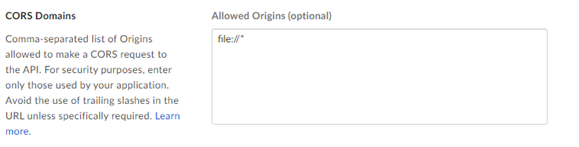
Per evitare un problema di CORS Box quando si utilizza l'app con autenticazione OAuth o token di accesso e JWT, utilizza una configurazione personalizzata:
App Box con autenticazione OAuth:
Aggiungi l'URI di reindirizzamento https://cef.alteryx.com/designer/oauthcallback per risolvere il problema di CORS della finestra CEF.

Immetti
file://*in Origini consentite.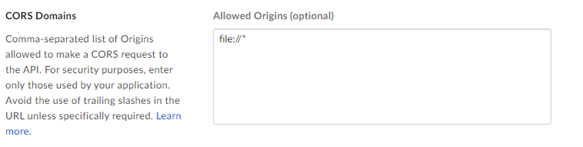
App Box con token di accesso e autenticazione JWT:
Immetti
file://*in Origini consentite.