Box
接続タイプ | Alteryxツール。最新のバージョンは、Alteryx Marketplace から入手できます。 |
サポートのタイプ | 読み取りと書き込み |
コネクタ1.0.0リリースノート(Python)
Designerとの互換性(検討中)
新機能
最新機能!
The Box connector defaults Time and DateTime precision to milliseconds to avoid extra trailing zeros, while still supporting nanosecond resolution when required by the workflow.
動作の変更
We've disabled the right-click context menu in Designer for the Box tools to prevent unintended actions.
解決済みの問題
解決済み コネクタリリースバージョンxxxx.x.x.xxxxx | |
|---|---|
ID | 説明 |
TPM-5038 | Newly created files in the Box tools inherit the previously selected filename when saved with any extension. |
TPM-5006 | Selecting Enable Dry Run in the Box Input tool (version 2.5.6) using a DCM connection with JWT authentication causes an error. |
TPM-4984 | The Box connector version 2.5.7 doesn’t recognize YXDB files. |
TPM-4948 | An error occurs when uploading a file using the Box tools. |
TPM-4853 | Special characters in the proxy password cause an error when setting up a manual proxy server for the Box tools. |
TPM-4782 | Secret values are exposed in the returned JSON in the Designer HTML Developer Tools for the Box tools. |
TPM-4754 | The Box Input tool returns a "list index out of range" error. |
TPM-4645 | The Box DCM connection returns an invalid access token error after 24 hours. |
TPM-4396 | The Box Input tool doesn’t function properly with DCM. |
TPM-4239 | The SharePoint Input (version 2.4.2) and Box Input (version 2.5.2) tools don’t return metadata for YXDB files that contain only a heading row. |
TPM-4192 | File name breadcrumbs don’t appear correctly in the Box UI. |
TPM-4191 | The Box Input tool version 2.5.6 on Python 3.10 adds extra decimal values to datetime fields. |
TPM-3832 | The SharePoint Input tool version 2.6.2 returns a "Python int too large to convert to C long" error. |
TPM-3334 | After upgrading to SDK version 2.4.0, null datetime values appear as NaT in CSV files using the Box tools. |
TPM-3266 | The SharePoint Input (version 2.4.2) and Box Input (version 2.5.2) tools don’t return metadata for CSV and XLSX files that contain only a heading row. |
既知の問題
既知 コネクタリリースバージョンxxxx.x.x.xxxxx | |
|---|---|
ID | 説明 |
JIRA-ID | 問題の説明 |
キャンセルされた問題
キャンセルされました コネクタリリースバージョンxxxx.x.x.xxxxx | |
|---|---|
ID | 説明 |
TPM-4190 | The dry run feature doesn’t work in the Box Input tool version 2.5.6. |
TPM-4049 | The Box Output tool returns errors when writing large XLSX files. |
TPM-3758 | The Box Output tool doesn’t retain selected fields as expected. |
TPM-3634 | File paths don’t update when files are deleted from the Box server using a browser. |
TPM-3479 | In Box version 2.5.5 (Python 3.8), using the 'Download file locally for later processing' feature with an empty or invalid location doesn’t work as expected in either scenario. |
TPM-3477 | INT data types upload as FLOAT types when viewed in the Box browser. |
TPM-3435 | The Box Output tool maps incorrect data types for XLSX files. |
TPM-2871 | The Box DCM connection returns an invalid access token error after 24 hours. |
TPM-2792 | The Box Input tools return a "Communication error: Failed to write Control In message" during validation. |
TPM-2267 | The Box Output tool writes an empty YXDB file if a field is of the DateTime data type. |
TPM-2246 | The Box Output tool displays an unclear error message for invalid CSV files. |
TPM-2133 | Field names are not automatically voiced in the Box tools. |
TPM-1568 | The Box tools experience a significant lag when users click away from the tool. |
バージョン | 説明 |
v2.5.6 |
|
v2.5.5 |
|
v2.5.4 |
|
v2.5.2 |
既知の問題
Alteryx Server には、SDKアクセスモード設定の すべて許可 値が必要です。 |
v2.5.1 |
既知の問題
|
v2.5.0 |
既知の問題
|
v2.4.0 |
|
v2.3.0 |
|
v2.2.0 |
|
v2.1.1 |
|
v1.0.0 |
|
接続に使用する Alteryx ツール

Boxコネクタを使用して、Boxワークスペースに保存されているファイルを利用することで、Designerからワークフローの実行、スケジュール設定、公開を行います。サポートされているファイルの種類はXLSX、CSV、YXDBです。
注意
Desktop Automation (スケジューラー)はこのコネクタではサポートされていません。
データ接続マネージャー
Boxツールバージョン2.5.0以降では、データ接続マネージャー をサポートしているため、資格情報をより簡単かつ安全に保存できます。Boxへの接続を作成し、Boxツールを含むワークフローで保存された資格情報を簡単に再利用できます。Alteryx Serverで公開ワークフローを正常に実行するには、保存された資格情報が必要です。
AMP Engineの有効化
Boxツールバージョン2.5.0以降を含むワークフローで AMP Engine が有効になっていることを確認し、Designerの機能を最大限に活用してください。
Box アプリの登録
Box資格情報を使用して https://alteryx.app.box.com/developers/console にログインします。
[アプリの新規作成] を選択します。
[カスタムアプリ] を選択します。
[認証方法] で、[ユーザー認証(OAuth 2.0)] を選択します。アプリ名 を入力して、[アプリの作成] を選択します。
アプリケーションスコープ の [設定] タブで [Boxに格納されているすべてのファイルとフォルダーの書き込み] を選択して、アプリに権限を付与します。
[変更を保存] を選択します。
新しい開発者トークンを生成するには、[取り消し] を選択して、[Generate Developer Token] を選択します。
認証には、OAuth 2.0資格情報 から クライアントID と クライアントシークレット を使用できます。
カスタムアプリケーションのセットアップ
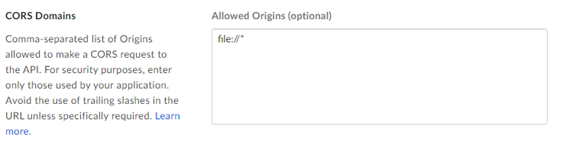
OAuth 認証またはアクセストークンと JWT でアプリを使用する際、Box CORS の問題を回避するには、カスタム設定を使用します。
OAuth 認証を使用する Box アプリ:
リダイレクト URI https://cef.alteryx.com/designer/oauthcallbackを追加して、CEFウィンドウのCORSの問題を解決します。

[許可する送信元] には「
file://*」を入力します。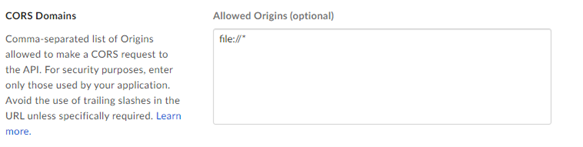
アクセストークンと JWT 認証を使用する Box アプリ:
[許可する送信元] には「
file://*」を入力します。