Box
Tipo de conexão | Ferramenta do Alteryx. A versão mais recente está disponível no Alteryx Marketplace. |
Tipo de suporte | Leitura e gravação |
Notas de versão do Conector 1.0.0 (Python)
Compatibilidade com o Designer (a ser discutida)
O que há de novo
Novos recursos!
The Box connector defaults Time and DateTime precision to milliseconds to avoid extra trailing zeros, while still supporting nanosecond resolution when required by the workflow.
Alterações no comportamento
We've disabled the right-click context menu in Designer for the Box tools to prevent unintended actions.
Problemas corrigidos
Corrigido Versão de lançamento do Conector xxxx.x.x.xxxxx | |
|---|---|
ID | Descrição |
TPM-5038 | Newly created files in the Box tools inherit the previously selected filename when saved with any extension. |
TPM-5006 | Selecting Enable Dry Run in the Box Input tool (version 2.5.6) using a DCM connection with JWT authentication causes an error. |
TPM-4984 | The Box connector version 2.5.7 doesn’t recognize YXDB files. |
TPM-4948 | An error occurs when uploading a file using the Box tools. |
TPM-4853 | Special characters in the proxy password cause an error when setting up a manual proxy server for the Box tools. |
TPM-4782 | Secret values are exposed in the returned JSON in the Designer HTML Developer Tools for the Box tools. |
TPM-4754 | The Box Input tool returns a "list index out of range" error. |
TPM-4645 | The Box DCM connection returns an invalid access token error after 24 hours. |
TPM-4396 | The Box Input tool doesn’t function properly with DCM. |
TPM-4239 | The SharePoint Input (version 2.4.2) and Box Input (version 2.5.2) tools don’t return metadata for YXDB files that contain only a heading row. |
TPM-4192 | File name breadcrumbs don’t appear correctly in the Box UI. |
TPM-4191 | The Box Input tool version 2.5.6 on Python 3.10 adds extra decimal values to datetime fields. |
TPM-3832 | The SharePoint Input tool version 2.6.2 returns a "Python int too large to convert to C long" error. |
TPM-3334 | After upgrading to SDK version 2.4.0, null datetime values appear as NaT in CSV files using the Box tools. |
TPM-3266 | The SharePoint Input (version 2.4.2) and Box Input (version 2.5.2) tools don’t return metadata for CSV and XLSX files that contain only a heading row. |
Problemas conhecidos
Conhecido Versão de lançamento do Conector xxxx.x.x.xxxxx | |
|---|---|
ID | Descrição |
JIRA-ID | Descrição do problema |
Problemas cancelados
Cancelado Versão de lançamento do Conector xxxx.x.x.xxxxx | |
|---|---|
ID | Descrição |
TPM-4190 | The dry run feature doesn’t work in the Box Input tool version 2.5.6. |
TPM-4049 | The Box Output tool returns errors when writing large XLSX files. |
TPM-3758 | The Box Output tool doesn’t retain selected fields as expected. |
TPM-3634 | File paths don’t update when files are deleted from the Box server using a browser. |
TPM-3479 | In Box version 2.5.5 (Python 3.8), using the 'Download file locally for later processing' feature with an empty or invalid location doesn’t work as expected in either scenario. |
TPM-3477 | INT data types upload as FLOAT types when viewed in the Box browser. |
TPM-3435 | The Box Output tool maps incorrect data types for XLSX files. |
TPM-2871 | The Box DCM connection returns an invalid access token error after 24 hours. |
TPM-2792 | The Box Input tools return a "Communication error: Failed to write Control In message" during validation. |
TPM-2267 | The Box Output tool writes an empty YXDB file if a field is of the DateTime data type. |
TPM-2246 | The Box Output tool displays an unclear error message for invalid CSV files. |
TPM-2133 | Field names are not automatically voiced in the Box tools. |
TPM-1568 | The Box tools experience a significant lag when users click away from the tool. |
Versão | Descrição |
v2.5.6 |
|
v2.5.5 |
|
v2.5.4 |
|
v2.5.2 |
Problema conhecido
O Alteryx Server exige o valor AllowAll das configurações do Modo de Acesso do SDK. |
v2.5.1 |
Problema conhecido
|
v2.5.0 |
Problema conhecido
|
v2.4.0 |
|
v2.3.0 |
|
v2.2.0 |
|
v2.1.1 |
|
v1.0.0 |
|
Ferramentas do Alteryx usadas para conexão

Use o conector do Box para executar, agendar e publicar fluxos de trabalho do Designer utilizando arquivos armazenados no seu espaço de trabalho do Box. Os tipos de arquivo compatíveis são XLSX, CSV e YXDB.
Cuidado
O Desktop Automation (Scheduler) não é compatível com esse conector.
Gerenciador de Conexões de Dados
As ferramentas do Box 2.5.0 e versões posteriores são compatíveis com o Gerenciador de Conexões de Dados para um armazenamento mais fácil e seguro de suas credenciais. Crie uma conexão com o Box e reutilize facilmente as credenciais armazenadas em fluxos de trabalho que incluem as ferramentas do Box. O Alteryx Server exige credenciais armazenadas para executar com êxito os fluxos de trabalho publicados.
Habilitar o AMP Engine
Certifique-se de ter o AMP Engine habilitado para os fluxos de trabalho que contêm as ferramentas do Box 2.5.0 e versões posteriores para aproveitar todo o potencial dos recursos do Designer.
Registro no aplicativo Box
Faça login em https://alteryx.app.box.com/developers/console usando suas credenciais do Box.
Clique em Criar novo aplicativo.
Selecione Aplicativo personalizado.
Em Método de autenticação, selecione Autenticação de usuário (OAuth 2.0). Insira o Nome do aplicativo e clique em Criar aplicativo.
Na guia Configuração em Escopos de aplicativo, selecione Gravar todas as pastas e arquivos armazenados no Box para fornecer permissão ao aplicativo.
Selecione Salvar alterações.
Para gerar um novo token de desenvolvedor, clique em Revogar, depois, em Gerar token de desenvolvedor.
Você pode usar ID e Segredo do cliente em Credenciais do OAuth 2.0 para autenticação.
Configuração personalizada do aplicativo
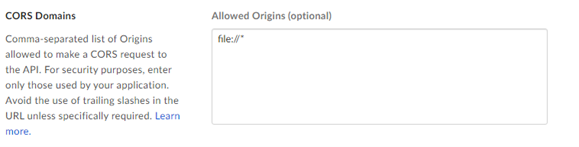
Para evitar um problema de CORS do Box ao usar o aplicativo com autenticação OAuth ou token de acesso e JWT, use uma configuração personalizada:
Aplicativo Box com autenticação OAuth:
Adicione o URI de redirecionamento https://cef.alteryx.com/designer/oauthcallback para solucionar o problema de CORS da janela do CEF.

Insira
file://*em Origens permitidas.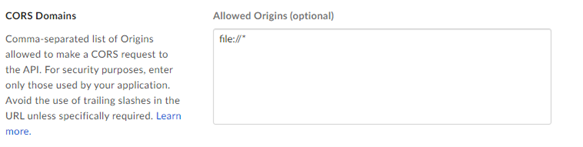
Aplicativo Box com token de acesso e autenticação JWT:
Insira
file://*em Origens permitidas.